
Chapters on the menu include:
- Counting & Addition
- Addition & Subtraction
- Multiplication
- Division
- Fractions
- Notation and Numeration
- Advanced Addition & Subtraction
- Long Multiplication
- Long Division
- Money, etc.
Click on any topic and a new page opens with a menu of online exhibits presented with interesting text and photographs to help you learn about:
* and much, much more!
When you’re through exploring the various “Subjects” use the menu to explore:
* Games – A fun array of interactive games that teach about science as they entertain.
- Free Typing Lessons – Use your computer’s keyboard and follow the simple instructions on the site to learn to type. The interactive program teaches 2 keys at a time, starting with the “home row.” Beginners will find a proper hand placement guide too.
- Free Typing Games – Choose from several different interactive, fun, arcade-like games that reinforce typing skills. For example, play “Meteor Typing Blast” and protect your spaceships from meteors and hostile UFOs – by using your typing skills to blast them out of the universe! Or for something a little less intense, try “Save the Sailboat Race.” Type the falling letters before they land on the boats and ruin the race!
- Free Typing Tests – Get an accurate word per minute assessment of your typing ability. The tests have timer options of 1 to 5 minutes. When you’re through, submit your speed on the world wide scoreboard for all to see. Or print out a certificate with your name and typing speed.

- American Circuses – Discover the history of well-known circuses such as Ringling Bros., Barnum and Bailey, Dailey Bros. Circus and many more.
- Famous Circus Performers – Learn about those performers who made their circus shows amazing including clowns, acrobats, human cannonballs, trapeze and tightrope artists, animal tamers and much more.
- Circus Owners and Staff – Examine the lives of the men and women who owned circuses.
- Circus Life – a brief overview of life in a circus
- Circus Sideshows – Find out what a sideshow is and see some sideshow crews.
- Sideshow Performers – See images of different sideshow performers from the past.
- Circus Candy Butchers – Discover what a “candy butcher” is and their importance to the survival of the circus.
- Circus Lingo and Slang – a glossary of circus terms
- Circus Movies – an affiliate-linked list of movies about the circus
- Circus Train Wrecks – a list of circus train wrecks and some statistics about them
- Circus News – news and announcements related to circuses
- Circus Links and Resources – Looking for more information about circuses? Check this section.
When you have finished your walk, use the menu on the left of the web page to see more images of the bridge by selecting:
- Historic Photos – See images of the chief engineer, Joseph B. Straus and the construction of the bridge.
- Contemporary Photos – View modern images of the art deco elements, beauty shots of the bridge, the Southeast Visitor area, bridge workers in action, and more.
- Then and Now – comparative views of the bridge
You may also want to dig deeper into the history of the Golden Gate Bridge by selecting the “Research Library” link. At this page visitors will find links to other pages filled with historical information, interesting facts and trivia, and much more.
Put on your virtual sneakers and enjoy the tour.
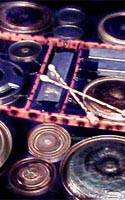
When you get to the site you’ll see three main options that include:
- Play the GameGongs – Use your mouse of keyboard as a virtual mallet to play the gongs made out of old paint can lids and hubcaps. You can also play loops of recorded songs and improvise as you play along.
- Play the Drone Gambira – Use your mouse to click on tongs and create your own musical composition. This also offers loops of recorded music that you can use to play along.
- Play the Game Chimes – Click on pictures of metal tubes to create short bursts or sustained tones. Play the pre-recorded loops as you experiment with the various sounds and tones.
Note: It may take a few minutes for all of the sounds to completely load. Be patient, turn on your speakers, and then use your mouse to create your own musical “click compositions” with the Gametone instruments.
Please note that there are other links on this site but they led to error messages when we tried them. Parents, as always, should preview and supervise exploration of this website.
Let us know if you enjoyed this post!

Like

Love

Happy

Haha

Sad