I thought I would share🎮 Charlie’s Streaming Company Starter Blueprint. This is a practical, budget‑friendly roadmap for a teen entrepreneur launching his own brand
💸 Can You Start a Streaming Company With $100?
Yes, a $100 is a reasonable budget — if you start lean and smart. Streaming is one of the few digital businesses where the barrier to entry is low. The key is using what you already have and investing only in the essentials.
Here’s how that $100 can be allocated:
| Item | Cost | Purpose |
|---|---|---|
| Basic USB microphone (Fifine, Tonor) | $25–$35 | Clear audio is more important than video quality |
| Ring light or clamp light | $10–$20 | Brightens his face and reduces shadows |
| Stream overlays & branding pack (Etsy or Canva Pro month) | $10–$15 | Makes his stream look professional |
| Entry-level capture card (optional) | $20–$30 | Only if he’s streaming console gameplay |
| Total | $65–$100 | Completely doable |
If he already has a mic or lighting, he can invest more into branding or software upgrades. For Charlie he was lucky because I had a microphone and ring camera he didn’t have to purchase. Have your teens ask their family and friends if they have anything he needs before spending money.
🧰 What People Needs to Start Streaming (Beginner-Friendly List)
🎤 Equipment
- A decent USB microphone
- Webcam (optional — many streamers start without one)
- Ring light or desk lamp
- Headphones (any pair works)
- A stable internet connection
🖥️ Software
- OBS Studio (free)
- StreamElements or StreamLabs (free overlays, alerts, widgets)
- Canva (free version is enough to start)
🎨 Branding Essentials
- Stream banner
- Profile picture
- Offline screen
- Starting soon / BRB screens
- Matching color palette (you can tie this into your pastel‑meets‑tech aesthetic for cross‑branding)
🤝 Affiliate Programs He Can Join Immediately (No Requirements)
These are beginner‑friendly and perfect for a new streamer:
🎮 Gaming & Tech
- Amazon Associates (easy to join, perfect for gear lists)
- Best Buy Affiliate Program
- Newegg Affiliate Program
- GameStop Affiliate Program
- Humble Bundle Partner Program (great for PC gamers)
🖥️ Streaming Tools
- StreamLabs Affiliate
- OWN3D.TV Affiliate (overlays, emotes, branding packs)
- Epidemic Sound Affiliate (music for streams)
🛠️ For The Guys’ Corner / C & D Honey-DOs tie-ins
📈 Daily Tasks to Grow Your Streaming Company: These are simple, consistent actions that build momentum:
🎥 1. Stream consistently (even 1-hour counts): Consistency beats long streams.
💬 2. Engage with viewers: Ask questions, respond to chat, build community.
🎞️ 3. Clip highlights daily
Post them on:
Short-form content is the fastest growth engine.
🧹 4. Update your affiliate links daily/weekly
Add them to:
- Stream description
- YouTube video descriptions
- The Guys’ Corner posts
- Create a “Starter Streaming Kit” if you have a place to share it. My mom will add my “Starter Streaming Kit” to her blog
🧠 5. Learn one new skill each day
Examples:
- Editing My mom can learn with me for her blog
- Thumbnail design
- OBS tricks
- SEO basics (ChatGPT can help with this)
🤝 6. Network with other small streamers
Collabs help everyone grow.
.
✨ Introducing King Gaming & Streaming: A New Chapter for Our Family Legacy
There are moments as a mom when you can feel God opening a brand‑new door for your child — a door they’re ready to walk through with confidence, creativity, and purpose. Today is one of those moments for our family.
Our son Charlie, known to his friends and online community as King, is officially launching his own company:
👑 King Gaming & Streaming
This is his second business venture, but the very first one he is building completely on his own, with his own vision, his own team of friends, and his own dreams guiding the way. And we couldn’t be more proud.
🎮 Why King Gaming & Streaming?
Charlie has always had a natural gift for leadership, creativity, and technology. Whether he’s gaming, helping others learn something new, or brainstorming ideas with his friends, he brings passion and heart into everything he does.
His friends have called him King for years — not because he’s loud or flashy, but because he leads with quiet confidence, loyalty, and strength. It’s a name that fits him, and now it becomes the foundation of his brand.
🎨 A Brand Built in Pink & Lavender
One of my favorite parts of this journey is watching him choose his brand colors — soft pinks and lavenders, the same colors Mikayla loves. It’s gentle, modern, and uniquely them.
And while this is Charlie’s company today, he has already shared that if he and Mikayla marry one day, this will be their company — a shared dream, a shared future, and a shared legacy.
Those colors represent unity, creativity, and a future filled with possibility.
🧩 What King Gaming & Streaming Will Offer
This company will grow with him, but here’s where it begins:
- Gaming livestreams
- Tech and gear reviews
- Tutorials and how‑to content
- Short‑form clips and highlights
- Affiliate recommendations
- Behind‑the‑scenes posts
- Collaborations with his friends
And yes — you’ll be able to follow his journey right here on the blog.
📍 Where You’ll Find His Updates
All official updates, reviews, and behind‑the‑scenes posts will live in:
🕹️ The Guys’ Corner on TheMommiesReviews.com
This gives him his own space — modern, clean, tech‑focused — while still being part of our family’s bigger story.
We’ll also feature his launch on the homepage so our community can celebrate with us.
🌱 A Family Rooted in Legacy
Our family has always believed in building something meaningful for the next generation. King Gaming & Streaming is more than a business — it’s a step toward independence, responsibility, and a future Charlie is shaping with his own hands.
We are grateful, proud, and excited to watch him grow.
Please join us in celebrating this new chapter for King, for his friends, and for the future he’s building.
🌟 Streaming Starter Series Announcement Post
For TheMommiesReviews.com + The Guys’ Corner Post Date: Friday at 9:00 AM CDT Image Style: Square infographic with a teen character (like C), pastel tech colors, and a “You Can Do This” vibe Platforms: Blog, Facebook, Twitter, Pinterest
✨ Post Title:
“Streaming Starter Series: Real Help for Real Families”
📝 Post Body (Blended Tone)
Streaming isn’t just for gamers. It’s for dreamers. For families. For teens like C. For moms like me. For anyone who wants to work from home and build something real — even if you don’t know where to start.
That’s why we’re launching the Streaming Starter Series — a beginner-friendly guide for:
- Homeschool families
- Teens with big ideas
- Adults who feel left behind by tech
- Anyone who needs extra income
- Anyone who wants to build a business from home
We’ll walk you through:
- What streaming is
- What gear you need
- How to set up your stream
- How to make friends and build community
- How to turn streaming into a side hustle
And we’ll be honest. Streaming takes time. It takes effort. It doesn’t make you rich overnight. But it can become a real business — just like Charlie’s new venture, King Gaming & Streaming.
This series is for beginners. For families. For people who want to learn together.
📅 When to Look for New Posts
| Day | Time | Topic |
|---|---|---|
| Saturday | 10:00 AM | What Is Streaming? |
| Monday | 12:00 PM | What You Need to Start |
| Wednesday | 8:00 PM | How to Set Up Your Stream |
| Friday | 9:00 AM | Going Live & Making Friends |
| Sunday | 9:00 AM | Streaming From Home — What’s Real |
💬 Facebook Caption for Announcement Post
Streaming Starter Series is here!
For homeschool families, beginners, and anyone who wants to work from home — even if you don’t know where to start.
Follow along and learn with us.
StreamingStarterSeries #WorkFromHome #FamilyBusiness #TheGuysCorner #TheMommiesReviews
🐦 Twitter Caption
Streaming isn’t just for gamers.
It’s for families.
It’s for beginners.
It’s for anyone who wants to work from home.
Our new series starts Friday.
StreamingStarterSeries #WorkFromHome #TheGuysCorner
🎮 Streaming Starter Series — Part 1: What Is Streaming?
Publish: Saturday at 10:00 AM CDT Category: The Guys’ Corner / Homeschool Tech / Work-From-Home Skills Image: The teen-friendly “What Is Streaming?” graphic above
✨ What Is Streaming? (Beginner-Friendly Guide for Families, Teens & Adults)
Welcome to the very first post in our Streaming Starter Series, created for homeschool families, teens like C, adults who feel “too old for tech,” and anyone who wants to learn how to work from home — even if you’re starting from zero.
Streaming isn’t just for gamers. It’s for creators. It’s for families. It’s for beginners. It’s for anyone who wants to share what they love with the world.
And yes — you can make money from it. But it doesn’t happen overnight.
Streaming takes:
- Time
- Practice
- Patience
- A little tech
- A lot of heart
This series will walk you through every step, one simple post at a time.
🎥 So… What Is Streaming?
Streaming means going LIVE on the internet and sharing:
- Your screen
- Your voice
- Your camera
- Your creativity
People stream:
- Video games
- Tutorials
- Crafts
- Cooking
- Music
- Art
- Just chatting
- Homeschool lessons
- Family projects
If you can teach it, show it, or talk about it — you can stream it.
🎮 Why Do People Stream?
People stream because:
- It’s fun
- It builds confidence
- It teaches real tech skills
- It helps you make friends
- It can become a business
- It can be done from home
Streaming is one of the most flexible work-from-home paths for:
- Teens
- Homeschool families
- Stay-at-home parents
- Adults needing extra income
- Anyone wanting a creative outlet
💸 Can You Make Money Streaming?
Yes — but here’s the truth we will repeat in every post:
You can work from home and make money… but it doesn’t happen overnight.
Streaming is a real job. It takes consistency. It takes learning. It takes showing up even when only two people are watching.
But if you stick with it, it can grow into:
- Affiliate income
- Sponsorships
- Donations
- Brand deals
- A full business (like C’s new company, King Gaming & Streaming)
👩👦 Mom’s Note (Your Voice)
As a mom, I love that streaming gives kids and teens a safe, creative way to express themselves, learn real skills, and even build a business from home. It’s something families can learn together — and that’s exactly what this series is about.
🧩 What’s Coming Next
Here’s what to expect in the next posts:
| Day | Time | Topic |
|---|---|---|
| Monday | 12 PM | What You Need to Start (Beginner Gear Checklist) |
| Wednesday | 8 PM | How to Set Up Your Stream (Step-by-Step) |
| Friday | 9 AM | Going Live & Making Friends |
| Sunday | 9 AM | Streaming From Home — What’s Real |
Each post will include:
- A teen-friendly image
- A simple guide
- A “Mom’s Note”
- A Guys’ Corner tip
- A reminder that streaming takes time
📣 Call to Action
If you’re a homeschool family, a teen, or an adult wanting to learn something new — follow along. You can do this. And we’ll do it together.
🎮 Streaming Starter Series — Part 2: What You Need to Start
Publish: Monday at 12:00 PM CDT Category: The Guys’ Corner / Homeschool Tech / Work-From-Home Skills Image: Checklist graphic (see card above) Printable Version: Ready for homeschool binders (see card above)
✨ Beginner’s Checklist: What You Need to Start Streaming
You don’t need fancy gear. You don’t need a studio. You don’t even need to know everything yet.
You just need a few basics — and the courage to begin.
This checklist is for:
- Teens like C
- Homeschool families
- Adults who feel “too old for tech”
- Anyone who wants to work from home
- Anyone who needs extra income
🧰 Basic Equipment (Start With What You Have)
- ✅ Microphone
- ✅ Headphones
- ✅ Webcam (optional)
- ✅ Ring Light
You can start with whatever you already own. Even a phone or tablet can work in the beginning.
💻 Free Software (Download & Install)
- ✅ OBS Studio
- ✅ Streamlabs
These are free, beginner-friendly, and used by millions of streamers. We’ll walk you through setup in the next post.
🪑 Workspace & Ideas
- ✅ Quiet Space
- ✅ Good Lighting
- ✅ Notebook for Goals
Streaming is easier when you have a cozy corner, a plan, and a little peace.
💬 Mom’s Note (Your Voice)
You don’t have to be tech-savvy. You don’t have to be young. You just have to be willing to learn.
Streaming can be a real work-from-home path — but it takes time, patience, and consistency.
🧩 What’s Coming Next
| Day | Time | Topic |
|---|---|---|
| Wednesday | 8 PM | How to Set Up Your Stream |
| Friday | 9 AM | Going Live & Making Friends |
| Sunday | 9 AM | Streaming From Home — What’s Real |
📣 Facebook Caption
Streaming Starter Series — Part 2 is live! Here’s your beginner checklist for teens, homeschool families, and anyone who wants to work from home. Start with what you have. You can do this. #StreamingStarterSeries #WorkFromHome #HomeschoolTech #TheGuysCorner #TheMommiesReviews
🐦 Twitter Caption
Streaming Starter Series — Part 2: What You Need to Start ✅ Mic ✅ Headphones ✅ Free software ✅ Quiet space ✅ Courage You can work from home. You can do this. #StreamingStarterSeries #WorkFromHome #HomeschoolTech
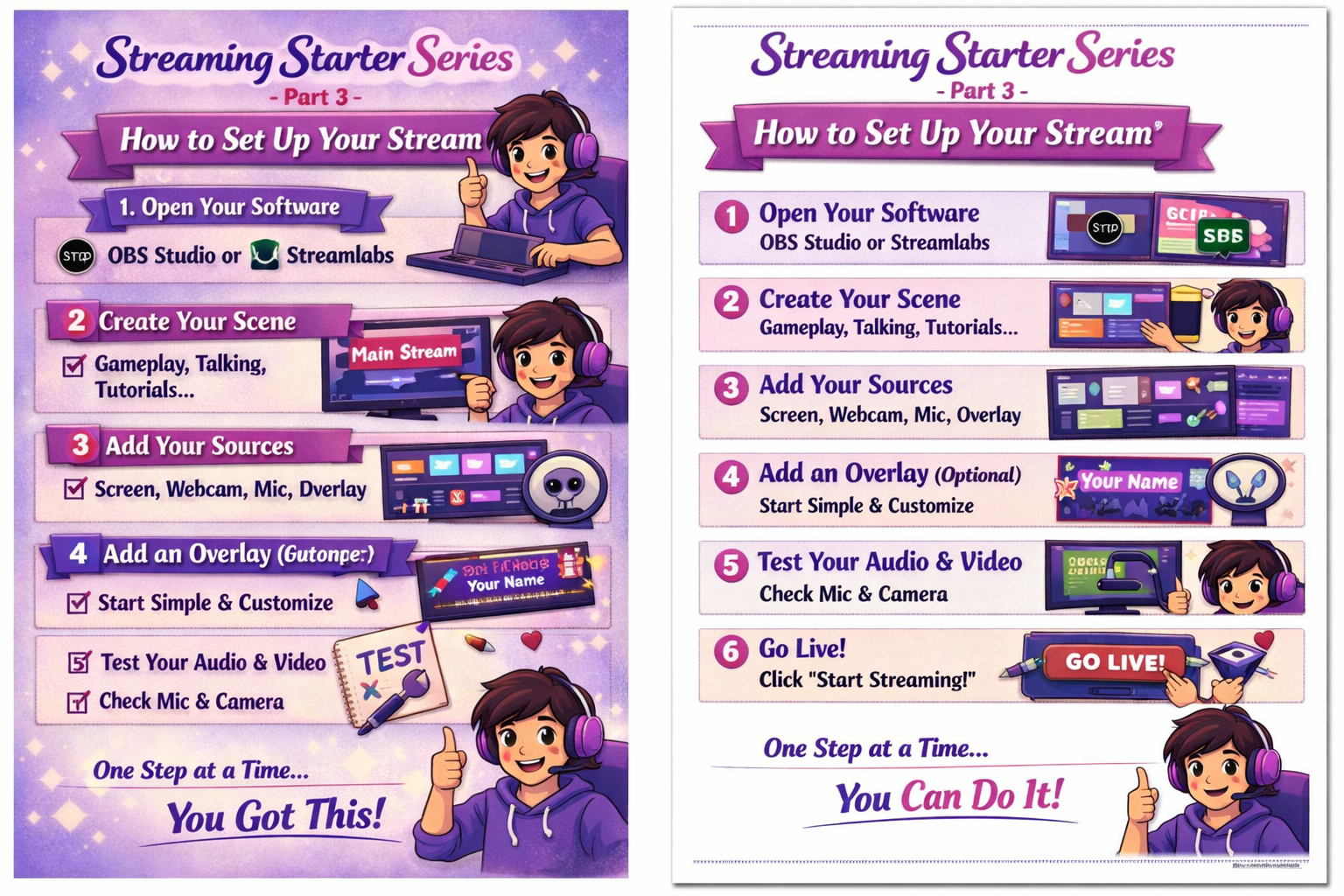
Publish: Wednesday at 8:00 PM CDT Category: The Guys’ Corner / Homeschool Tech / Work-From-Home Skills Image: Step-by-step visual (coming next) Printable Version: Optional setup guide for homeschool binders
✨ Let’s Set Up Your First Stream (Step-by-Step)
You’ve got your gear. You’ve downloaded your software. Now it’s time to go live — but don’t worry, we’ll walk you through it.
This guide is for:
- Teens like C
- Homeschool families
- Adults who feel “too old for tech”
- Anyone who wants to work from home
- Anyone who needs extra income
🧩 Step 1: Open Your Streaming Software
Use either:
- OBS Studio
- Streamlabs
Both are free and beginner-friendly. Open the app and look for the “Scenes” and “Sources” panels.
🖥️ Step 2: Create Your First Scene
A scene is what your viewers will see. You can create one for:
- Gameplay
- Talking
- Tutorials
- Crafts
- Cooking
Name it something simple like “Main Stream.”
🎥 Step 3: Add Your Sources
Sources are the pieces of your stream:
- ✅ Display Capture (your screen)
- ✅ Video Capture Device (your webcam)
- ✅ Audio Input (your microphone)
- ✅ Image or Overlay (your branding)
You can drag and resize each one.
🎨 Step 4: Add an Overlay (Optional)
Overlays make your stream look professional. You can use:
- Free templates from Streamlabs
- Canva graphics
- Etsy packs
- Your own designs
Start simple — even a name banner helps.
🔊 Step 5: Test Your Audio & Video
Before you go live:
- ✅ Check your mic volume
- ✅ Check your webcam angle
- ✅ Do a test recording
- ✅ Watch it back
This helps you fix any issues before your audience sees them.
🚀 Step 6: Go Live (When You’re Ready)
Click “Start Streaming.” Your stream will go live on the platform you connected (Twitch, YouTube, Facebook, etc.)
Don’t worry if no one shows up at first. Streaming takes time. You’re building something real.
💬 Mom’s Note (Your Voice)
Setting up your stream is like setting up a classroom, a kitchen, or a cozy corner. It’s your space. It’s your voice. And it’s okay to start small.
Streaming is a real work-from-home path — but it doesn’t happen overnight. It happens one step at a time.
📣 Facebook Caption
Streaming Starter Series — Part 3 is live! Here’s your step-by-step guide to setting up your first stream — for teens, homeschool families, and adults who want to work from home. You can do this. #StreamingStarterSeries #WorkFromHome #HomeschoolTech #TheGuysCorner #TheMommiesReviews
🐦 Twitter Caption
Streaming Starter Series — Part 3: How to Set Up Your Stream ✅ Scenes ✅ Sources ✅ Audio ✅ Overlay ✅ Go Live You’re building something real. #StreamingStarterSeries #WorkFromHome #HomeschoolTech
Let us know if you enjoyed this post!

Like

Love

Happy

Haha

Sad